API Documentation
The Python API is a AI powered Python library to communicate with the robot. Basic tasks like planning motions and moving the robot are offered as well as more complex AI powered functionalities like picking, scanning, object segmentation and a lot more. Moreover utility functions for ROS message conversions, transformations, and return codes are provided.
The library includes two python packages:
neurapy_aineurapy_ai_utils
In the neurapy_ai package, different python clients and some utility functions can be found. The neurapy_ai_utils package contains the robot kinematics, the gripper interface and robot actions.
Robot Kinematics
Within the neurapy_ai_utils the robot kinematics are provided to handle kinematics-related operations like planning and executing motions and manage different end-effectors.
There are three types of robot kinematics:
DummyKinematics: This mode will print the movement command and its parameters.
MoveitKinematics: This mode will move the robot using Moveit. To use this, you need to start Moveit with the command:
roslaunch maira_picker_moveit_config demo.launchMairaKinematics: This mode will command either the real or simulated robot.
For a detailed class overview, click on the links provided below:
neurapy_ai_utils.robot.maira_kinematicsneurapy_ai_utils.robot.dummy_kinematics
Move the robot using MairaKinematics
First import the he MairaKinematics class from the maira_kinematics module, which is part of the neurapy_ai_utils.robot package.
Create an instance of the MairaKinematics class and assign it to the variable robot.
1from neurapy_ai_utils.robot.maira_kinematics import MairaKinematics
2robot = MairaKinematics()
To move the robot joints to a cartesian goal pose, use the move_joint_to_cartesian method and set a pose as goal.
1goal_pose = [0.0,1.0,0.5,-math.pi,0.0,-math.pi]
2
3print("Moving to cartesian goal...")
4robot.move_joint_to_cartesian(goal_pose)
The robot can also be moved to a joint position.
1joint_pose=[100*math.pi/180,25*math.pi/180,160*math.pi/180,-75*math.pi/180,9*math.pi/180,-78*math.pi/180,-96*math.pi/180]
2
3print("Moving to joint goal...")
4robot.move_joint_to_joint(joint_pose)
To get the current cartesian tcp pose or the current joint states, simply call the respective methods:
1tcp_pose = robot.get_current_cartesian_tcp_pose()
2print(f"Current tcp pose: {tcp_pose}")
3joint_state = robot.get_current_joint_state()
4print(f"Current joint state: {joint_state}")
Plan a motion using the various planning methods. Each planned motion is saved with an ID and can be executed by referencing this ID. To clear a planned motion, call its ID. Multiple IDs can be executed or deleted by inputing a list of IDs.
 1print("Plan a motion to cartesian goal ...")
 2success, id_motion1, joint_states = robot.plan_motion_joint_to_cartesian(goal_pose, speed=1, acc=1, reusable=True)
 3print("Execute a planned motion ...")
 4robot.execute([id_motion1], True)
 5print("Plan a motion to joint goal ...")
 6success, id_motion2, joint_states = robot.plan_motion_joint_to_joint(joint_pose, speed=10, reusable=True)
 7print("Execute a planned motion ...")
 8robot.execute([id_motion2], True)
 9print("Plan a linear movement ...")
10success, id_motion3, joint_states = robot.plan_motion_linear(goal_pose, reusable=True)
11print("Execute a planned motion ...")
12robot.execute([id_motion3], True)
13print("Clearing ids...")
14robot.clear_ids([id_motion1, id_motion2, id_motion3])
Gripper Interface
Several gripper interfaces are provided within the neurapy_ai_utils.grippers package.
Create an instance of the gripper class and call open or close to control the gripper.
1from neurapy_ai_utils.grippers import Robotiq2F140Gripper
2
3gripper = Robotiq2F140Gripper()
4
5gripper.open()
6gripper.close()
For more information, see the class documentation: neurapy_ai_utils.grippers.gripper_interface.
Clients
Audio Output Client
The Audio Output client enables users to play audio files either on the robot or a local speaker. Additionally, this client provides functionality for playing various types of audio feedback including beeps and custom audio files.
Input Parameters
audio_file_path: Path to your audio file to play (supports various audio formats like .mp3, .wav, etc.)blocking_flag: Boolean flag to block robot motion during playing the audio (default: True)target_device: String specifying the output device - either “robot” to use robot speaker, or “local” to use PC speaker (default: “robot”)
Class Definition
Methods
Method |
Description |
|---|---|
|
Play a negative feedback beep sound on the robot. |
|
Play a neutral feedback beep sound on the robot. |
|
Play a double neutral feedback beep sound on the robot. |
|
Play a positive feedback beep sound on the robot. |
|
Play an audio file on either the robot or local system. |
|
Stop playing all audio in the robot system (publishes stop command). |
|
Play a test audio sound on the robot. |
Example
 1from neurapy_ai.clients.audio_output_client import AudioOutputClient
 2from neurapy_ai.utils.return_codes import ReturnCodes
 3
 4# Initialize Audio Client
 5aoc_ = AudioOutputClient()
 6
 7# Example 1: Play audio on robot
 8audio_file_path = "/usr/share/sounds/alsa/Front_Right.wav"
 9blocking_ = True
10target_ = "robot"
11try:
12    ret_ = aoc_.play_audio(audio_file_path, blocking_, target_)
13    if ret_.value != ReturnCodes.SUCCESS:
14        print(ret_.message)
15except Exception as e:
16    print(e)
17
18# Example 2: Play feedback beep
19try:
20    # Play positive feedback beep
21    ret_ = aoc_.beep_positive(blocking=True)
22    if ret_.value != ReturnCodes.SUCCESS:
23        print(ret_.message)
24except Exception as e:
25    print(e)
Notes
When playing audio locally, ensure the audio file exists on the local machine
The blocking parameter determines whether the execution should wait for audio playback to complete
For robot audio playback, the file should be accessible from the robot’s file system
The client uses ROS services for robot audio playback and sounddevice for local playback
Autonomous Pick Client
The autonomous pick client generates grasps for known and unknown CAD models. This client does not require pre-recording of grasp poses and only optionally requires prior training of an object segmentation model when selective object picking is needed.
Parameters
object_names: List of object CAD models to be detected. If empty, grasps will be generated based on the point cloud in the region of interest.workspace_name: Name of the recorded workspace to be used for detection.gripper_name: Name of the gripper to be used (must match the name as shown in GUI: Settings –> Tools).bin_name: Optional name of the bin to be used. If empty, bin detection will not be used.
Class Definition
Methods
Method |
Description |
|---|---|
|
Reset GraspGeneratorClient parameters to defaults. |
|
Start grasp detection (acquires vision data and triggers grasp generation). |
|
Wait for the detection to complete and return the generated grasps. |
Default Parameters
The client uses the following default parameters for grasp generation:
Maximum pick attempts per capture: 1
Collision checking with workspace: Enabled
Pre-grasp distance: 0.1
Post-grasp distance: 0.15
Maximum number of grasps: 50
Collision space padding: 0.005
End effector type: Two-fingered (0)
Example
 1from neurapy_ai.clients.autonomous_pick_client import AutonomousPickClient
 2from neurapy_ai.utils.return_codes import ReturnCodes
 3
 4# Initialize Autonomous Pick Client
 5apc = AutonomousPickClient()
 6
 7# Define detection parameters
 8object_names = []  # Empty list for general grasp detection
 9workspace_name = "workspace_3"  # Name of recorded workspace
10gripper_name = "RobotiQ_140"  # Must match GUI settings
11bin_name = ""  # Optional bin name
12
13try:
14    # Start grasp detection
15    ret_detection = apc.start_detection(
16        object_names,
17        workspace_name,
18        gripper_name,
19        bin_name,
20    )
21
22    # Check detection result
23    if ret_detection.value != ReturnCodes.SUCCESS:
24        print(ret_detection.message)
25    else:
26        # Get generated grasps
27        ret_picks, picks = apc.get_picks()
28        if ret_picks.value != ReturnCodes.SUCCESS:
29            print(ret_picks.message)
30        else:
31            # Process generated grasps
32            for pick in picks:
33                print(pick)
34
35except Exception as e:
36    print(e)
Notes
The client uses vision data (point cloud, RGB, depth) for grasp generation
Bin detection is optional and can be enabled through configuration
Object segmentation is only performed when object_names is not empty
The client provides audio feedback for detection failures
Grasp generation parameters can be customized using reset_GGC_parameters()
Base AI Client
The Base AI Client serves as the interface class for all AI clients in the system. It provides common functionality for parameter management, service and action client handling, and logging configuration.
Parameters
node_name: Name of the ROS node to connect toservice_proxy: List of service proxies that the node publishesaction_clients: List of action clients that the node publisheshas_parameters: Flag indicating whether the node has reconfiguration parameters (default: True)log_level: Logging level for the client (default: 20/INFO). Options: * 50 (CRITICAL) * 40 (ERROR) * 30 (WARNING) * 20 (INFO) * 10 (DEBUG)
Class Definition
Methods
Method |
Description |
|---|---|
|
Reset the node’s dynamic reconfigure parameters to their default values. |
|
Set multiple dynamic reconfigure parameters from a dictionary. |
|
Set a single dynamic reconfigure parameter value. |
Example
 1from neurapy_ai.clients.base_ai_client import BaseAiClient
 2import rospy
 3from actionlib import SimpleActionClient
 4
 5# Initialize base client
 6node_name = "example_node"
 7service_proxies = []  # List of service proxies
 8action_clients = []   # List of action clients
 9
10try:
11    # Create base client with default parameters
12    client = BaseAiClient(
13        node_name=node_name,
14        service_proxy=service_proxies,
15        action_clients=action_clients,
16        has_parameters=True,
17        log_level=20  # INFO level
18    )
19
20    # Set a single parameter
21    client.set_parameter("example_param", 42)
22
23    # Set multiple parameters
24    params = {
25        "param1": 100,
26        "param2": "value"
27    }
28    client.set_parameters(params)
29
30    # Reset to default parameters
31    client.reset_parameters()
32
33except Exception as e:
34    print(f"Error: {e}")
Notes
The client automatically checks for node existence and service/action availability
Logging is configured with a custom formatter (NeuraLogFormatter)
Dynamic parameter configuration is optional (controlled by has_parameters)
The client will create a unique ROS node if none exists
Service and action client connections are verified with timeouts
All parameter operations include error checking and logging
Bin Detection Client
The Bin Detection Client provides functionality to detect and track the pose of bins in the workspace. It supports both pre-recorded workspace-based detection and instance segmentation-based approaches.
Parameters
bin_name: Name of the bin to detectworkspace_name: Name of the workspace where the bin is locatedbin_mesh: Optional triangle mesh message of the bin defined by NEURA Robotics. If not provided, the mesh file will be read based on the bin namepointcloud_topic: Name of the pointcloud topic from 3D camera (default: “/camera/depth_registered/points”)method: Detection method type (default: WITHOUT_PREPROCESSING): * WITHOUT_PREPROCESSING: Uses pre-recorded workspace * WITH_PREPROCESSING: Uses instance segmentation based approach
Class Definition
neurapy_ai.clients.bin_detection_client
Methods
Method |
Description |
|---|---|
|
Detect bin pose from a point cloud topic (return code + detected bin pose). |
|
Retrieve the most recently detected pose for a bin (or the initial recorded pose if no detection was performed). |
Example
 1from neurapy_ai.clients.bin_detection_client import BinDetectionClient
 2from neurapy_ai.utils.return_codes import ReturnCodes
 3from neura_bin_detection_msgs.msg import MethodType
 4
 5# Initialize Bin Detection Client
 6bdc = BinDetectionClient()
 7
 8# Define detection parameters
 9bin_name = "example_bin"
10workspace_name = "example_workspace"
11pointcloud_topic = '/camera/depth_registered/points'
12method = MethodType.WITHOUT_PREPROCESSING
13
14try:
15    # Detect bin pose
16    ret_detection, detected_bin_pose = bdc.detect_bin_pose(
17        bin_name=bin_name,
18        workspace_name=workspace_name,
19        bin_mesh=None,  # Use default mesh
20        pointcloud_topic=pointcloud_topic,
21        method=method
22    )
23
24    if ret_detection.value != ReturnCodes.SUCCESS:
25        print(ret_detection.message)
26    else:
27        print("Detected Pose:", detected_bin_pose)
28
29    # Get previously detected pose
30    ret_pose, bin_pose = bdc.get_bin_pose(bin_name=bin_name)
31    if ret_pose.value != ReturnCodes.SUCCESS:
32        print(ret_pose.message)
33    else:
34        print("Bin Pose:", bin_pose)
35
36except Exception as e:
37    print(e)
Notes
The client requires a running ROS node and access to point cloud data
Point cloud messages are expected to be in PointCloud2 format
Service calls have a 3-second timeout for point cloud messages
The client automatically handles mesh file loading if not provided
Detection results are cached internally for subsequent queries
The client provides detailed logging for service calls and errors
Both detection methods (WITH/WITHOUT_PREPROCESSING) are supported
The client inherits error handling and logging from BaseAiClient
Data Based Pick Client
The Data Based Pick Client generates grasps for known CAD models using pre-recorded grasp poses. This client requires training a segmentation model and pose estimation model for objects, along with grasp pose recording.
Parameters
object_names: List of object CAD models to be detectedworkspace_name: Name of the recorded workspace to be used for detectiongripper_name: Name of the gripper to be used (must match the name as shown in GUI: Settings –> Tools)bin_name: Optional name of the bin to be used. If empty, bin detection will not be used
Class Definition
Methods
Method |
Description |
|---|---|
|
Reset GraspGeneratorClient parameters to defaults. |
|
Start grasp detection (acquires vision data, runs segmentation + pose estimation, then generates grasps). |
|
Wait for the detection to complete and return the generated grasps. |
Default Parameters
The client uses the following default parameters for grasp generation:
Maximum pick attempts per capture: 1
Collision checking with workspace: Enabled
Pre-grasp distance: 0.1
Post-grasp distance: 0.15
Maximum number of grasps: 50
Collision space padding: 0.005
End effector type: Two-fingered (0)
Example
 1from neurapy_ai.clients.data_based_pick_client import DataBasedPickClient
 2from neurapy_ai.utils.return_codes import ReturnCodes
 3
 4# Initialize Data Based Pick Client
 5dbpc = DataBasedPickClient()
 6
 7# Define detection parameters
 8object_names = ["puzzle_half_trapezoid", "puzzle_cuboid_red"]
 9workspace_name = "workspace_3"  # Name of recorded workspace
10gripper_name = "RobotiQ_140"   # Must match GUI settings
11bin_name = ""                  # Optional bin name
12
13try:
14    # Start grasp detection
15    ret_detection = dbpc.start_detection(
16        object_names=object_names,
17        workspace_name=workspace_name,
18        gripper_name=gripper_name,
19        bin_name=bin_name
20    )
21
22    if ret_detection.value != ReturnCodes.SUCCESS:
23        print(ret_detection.message)
24    else:
25        # Get generated grasps
26        ret_picks, picks = dbpc.get_picks()
27        if ret_picks.value != ReturnCodes.SUCCESS:
28            print(ret_picks.message)
29        else:
30            # Process generated grasps
31            for pick in picks:
32                print(pick)
33
34except Exception as e:
35    print(e)
Notes
The client requires trained segmentation and pose estimation models
Vision data (point cloud, RGB, depth) is used for object detection
Bin detection is optional and can be enabled through configuration
The client provides audio feedback for detection failures
Grasp generation parameters can be customized using reset_GGC_parameters()
The client uses TF for coordinate transformations
Instance segmentation and pose estimation are performed sequentially
Collision checking can be enabled/disabled through parameters
The client supports both two-fingered and suction end effectors
Data Generation Client
The Data Generation Client provides functionality to generate synthetic datasets using CAD models with configurable parameters for camera distance and lighting conditions.
Input Parameters
dataset_name: Name of the output datasetobject_names: List of CAD model names to be used in dataset generation. Models should be stored inHOME/data/object_perception/objects/user_objectsimages_generated_count: Number of images to be generatedcamera_distance_range: Tuple of (min, max) distance in meters between camera and objectslight_energy_range: Tuple of (min, max) light energy in Wm-2 (for SUN light type) or W (for other light types)
Class Definition
Methods
Method |
Description |
|---|---|
|
Generate a synthetic dataset with specified parameters. |
Example
 1from neurapy_ai.clients.data_generation_client import DataGenerationClient
 2from neurapy_ai.utils.return_codes import ReturnCodes
 3import os
 4
 5# Initialize Data Generation Client
 6dgc = DataGenerationClient()
 7
 8# Configure dataset generation parameters
 9output_dataset_name = "synthetic_dataset_1"
10object_names = ["puzzle_cuboid", "binzel_objects"]  # Objects as shown in AI Hub GUI
11num_images = 10
12
13# Camera distance range in meters
14camera_distance_range = (0.2, 2.5)
15
16# Light energy range in W.m^-2 (SUN) or W (other types)
17light_energy_range = (100, 400)
18
19try:
20    # Generate the synthetic dataset
21    ret_code = dgc.generate_synthetic_dataset(
22        dataset_name=output_dataset_name,
23        object_names=object_names,
24        images_generated_count=num_images,
25        camera_distance_range=camera_distance_range,
26        light_energy_range=light_energy_range
27    )
28
29    if ret_code.value != ReturnCodes.SUCCESS:
30        print(ret_code.message)
31    else:
32        print(f"Dataset {output_dataset_name} was generated successfully!")
33        print(f"Output Dataset Directory: {os.getenv('HOME')}/data/object_perception/training_data/{output_dataset_name}")
34
35except Exception as e:
36    print(e)
Notes
The client uses ROS action client for dataset generation
Progress updates are provided during generation
Supports user interruption with SIGINT (Ctrl+C)
Light type is randomly chosen between POINT, SUN, SPOT, and AREA
Objects must be available in the neura-style folder structure
Generated datasets are stored in the object perception training data directory
Data Management Client
The Data Management Client provides functionality to query and retrieve information about known objects, segmentation models, pose estimation models, and datasets in the system.
Input Parameters
model_name: Name of the selected modelobject_name: Name of the selected objectdataset_name: Name of the selected dataset
Class Definition
neurapy_ai.clients.data_management_client
Methods
Method |
Description |
|---|---|
|
Retrieve information about a given segmentation model (return code + model info dict). |
|
Retrieve information about a given pose estimation model (return code + model info dict). |
|
Retrieve information about a given object including symmetry and size details. |
|
Retrieve information about a given dataset including size statistics. |
|
Return the names of all known objects. |
|
Return the names of all known segmentation models. |
|
Return the names of all known pose estimation models. |
|
Return the names of all known datasets. |
|
Return the names of segmentation models that were trained to recognize the given object. |
|
Return the names of pose estimation models that were trained for localizing the given object. |
Return Values
All methods return a tuple containing:
* return_code: A ReturnCode object indicating success or failure
* data: The requested information in dictionary format (for info methods) or list format (for listing methods)
Example
 1from neurapy_ai.clients.data_management_client import DataManagementClient
 2from neurapy_ai.utils.return_codes import ReturnCodes
 3
 4# Initialize Data Management Client
 5dmc = DataManagementClient()
 6
 7try:
 8    # List all known segmentation models
 9    ret_code, models = dmc.get_all_segmentation_models()
10    if ret_code.value != ReturnCodes.SUCCESS:
11        print(ret_code.message)
12    print(f"There are {len(models)} segmentation models available:")
13    for model in models:
14        print(f"{model}")
15
16    # Get information about a segmentation model
17    model_name = "segmentation_model"
18    method = "detectron2"
19    ret_code, data = dmc.get_segmentation_model_info(model_name, method)
20    if ret_code.value == ReturnCodes.SUCCESS:
21        print(f"Model info: {data}")
22
23    # List all known objects
24    ret_code, objects = dmc.get_all_objects()
25    if ret_code.value != ReturnCodes.SUCCESS:
26        print(ret_code.message)
27    print(f"There are {len(objects)} objects available.")
28
29    # Get all segmentation models for an object
30    object_name = "mouse"
31    ret_code, models = dmc.get_segmentation_models_for_object(object_name)
32    if ret_code.value != ReturnCodes.SUCCESS:
33        print(ret_code.message)
34    print(f"The object {object_name} is recognized by the following models:")
35    for model in models:
36        print(f"{model}")
37
38except Exception as e:
39    print(e)
Notes
The client uses ROS service proxies for communication
All methods handle service call failures gracefully
Object information includes symmetry details and size measurements
Dataset information includes statistics about training, validation, and test sets
Model information includes version history and associated datasets
Database Client
The Database Client provides functionality to read robot and workspace related information that are saved by the user via the robot HMI.
Input Parameters
workspace_name: Name of the registered workspaceend_effector_name: Name of the registered end effector (defaults to currently selected end effector)point_name: Name of the registered point to get pose/joint states
Class Definition
Methods
Method |
Description |
|---|---|
|
Read a workspace stored in the database. |
|
Read an end effector stored in the database (empty name returns the currently selected end effector). |
|
Read a database point as a TCP pose in the robot coordinate frame. |
|
Read a database point as joint positions. |
|
Update information on the database server memory. |
Return Values
Most read operations return Tuple[ReturnCode, <data>].
ReturnCode: Numerical code and message indicating the operation resultReturned data (varies by method):
Workspace: Workspace pose, frame, dimensions, lookat poses, type, mesh model, etc.EndEffector: Name, Neura-supported type name, and TCP posePose: TCP pose in robot coordinate frameList[float]: Joint positions
update_database() returns a single ReturnCode.
Example
 1from neurapy_ai.clients.database_client import DatabaseClient
 2from neurapy_ai.utils.return_codes import ReturnCodes
 3
 4# Initialize Database Client
 5dbc = DatabaseClient()
 6
 7try:
 8    # 1. Get workspace information
 9    workspace_name = "workspace_test"
10    ret_code, workspace = dbc.get_workspace(workspace_name)
11    if ret_code.value != ReturnCodes.SUCCESS:
12        print(ret_code.message)
13    print(f"Workspace {workspace.name} in {workspace.frame} frame has dimensions:")
14    print(f"x: {workspace.len_x}, y: {workspace.len_y}, z: {workspace.len_z}")
15    print(f"Workspace pose: {workspace.pose}")
16    print(f"Lookat pose: {workspace.lookat_poses[0].pose}")
17    print(f"Lookat joint states: {workspace.lookat_poses[0].joint_state}")
18
19    # 2. Get end effector information
20    gripper_name = "RobotiQ_140"  # Name from GUI: Settings --> Tools
21    ret_code, end_effector = dbc.get_end_effector(gripper_name)
22    if ret_code.value != ReturnCodes.SUCCESS:
23        print(ret_code.message)
24    print(f"Gripper {end_effector.name} has TCP pose: {end_effector.tcp_pose}")
25
26    # 3. Get recorded point pose
27    point_name = "P20"
28    ret_code, tcp_pose = dbc.get_pose(point_name)
29    if ret_code.value != ReturnCodes.SUCCESS:
30        print(ret_code.message)
31    print(f"Point {point_name} has pose: {tcp_pose}")
32
33    # 4. Get recorded point joint positions
34    ret_code, joint_positions = dbc.get_joint_positions(point_name)
35    if ret_code.value != ReturnCodes.SUCCESS:
36        print(ret_code.message)
37    print(f"Point {point_name} has joint states: {joint_positions}")
38
39except Exception as e:
40    print(e)
Notes
Workspace types can be either “tabletop” or “bin”
End effector information includes Neura-supported type names
TCP poses are returned in robot coordinate frame
Database is automatically updated on client initialization
All methods handle failures gracefully
Instance Segmentation Client
The Instance Segmentation Client provides functionality to segment object instances or train instance segmentation models. It supports two main operation modes:
Training: Train an instance segmentation model using images from real or synthetic datasets
Inference: Use a trained model to segment images and localize instances of objects the model is trained to detect
Input Parameters
The parameters vary depending on the operation mode:
Training Mode
model_name: Name of the instance segmentation model to savedataset_names: List of dataset names to use for trainingdataset_types: List of dataset types (“real” or “synthetic”)method: Training method to use (default: “detectron2”)num_iterations: Number of training iterations (default: 1)warmup_iterations: Steps to linearly increase learning rate (default: 0)learning_rate: Base learning rate (default: 0.0003)batch_size: Samples per batch (default: 1)checkpoint_iterations: Iterations between checkpoints (default: 1)filter_empty_images: Skip images without annotations (default: True)pretrained_model: Name of model to use as base (default: “”)
Inference Mode
model_name: Name of the instance segmentation model to usemodel_version: Version of the model (default: “newest”)class_names: Optional list of object class names to detect
Class Definition
neurapy_ai.clients.instance_segmentation_client
Methods
Method |
Description |
|---|---|
|
Load a new instance segmentation model. |
|
Get the currently loaded model name + version (and return code). |
|
Load a new instance segmentation method. |
|
Get the current instance segmentation method (and return code). |
|
Segment instances from the current scene (return code + instances + combined mask + input image). |
|
Segment instances from a provided RGB image (return code + instances + combined mask). |
|
Visualize segmentation results with bounding boxes, masks, and class labels. |
|
Train a new segmentation model. |
Return Values
Methods return different types of values depending on their purpose:
Model management methods return: -
ReturnCode: Success/failure status with message - Model name and version (where applicable)Segmentation methods return: -
ReturnCode: Success/failure status - List ofSegmentedInstanceobjects - Segmentation mask as numpy array - Input image (for scene segmentation)Training method returns: -
ReturnCode: Success/failure status with message
Example
Training a Model
 1from neurapy_ai.clients.instance_segmentation_client import InstanceSegmentationClient
 2from neurapy_ai.utils.return_codes import ReturnCodes
 3
 4# Initialize client with training enabled
 5isc = InstanceSegmentationClient(training=True)
 6
 7try:
 8    # Train a new model
 9    ret_code = isc.train_segmentation_model(
10        model_name="my_model",
11        dataset_names=["dataset1", "dataset2"],
12        dataset_types=["real", "synthetic"],
13        num_iterations=40,
14        warmup_iterations=5,
15        learning_rate=0.001,
16        batch_size=2,
17        checkpoint_iterations=10
18    )
19
20    if ret_code.value != ReturnCodes.SUCCESS:
21        print(ret_code.message)
22    else:
23        print("Training completed successfully!")
24
25except Exception as e:
26    print(e)
Performing Inference
 1import cv2
 2from neurapy_ai.clients.instance_segmentation_client import InstanceSegmentationClient
 3from neurapy_ai.utils.return_codes import ReturnCodes
 4
 5# Initialize client
 6isc = InstanceSegmentationClient("my_model")
 7
 8try:
 9    # Load an image
10    image = cv2.imread("test_image.jpg")
11
12    # Get segmentation results
13    ret_code, instances, mask = isc.get_segmented_instances_from_image(
14        image,
15        class_names=["object1", "object2"]
16    )
17
18    if ret_code.value != ReturnCodes.SUCCESS:
19        print(ret_code.message)
20    else:
21        # Visualize results
22        result_image = isc.visualize_segmentation_result(
23            image, instances, mask
24        )
25        cv2.imshow("Segmentation Result", result_image)
26        cv2.waitKey(0)
27
28except Exception as e:
29    print(e)
Notes
The client uses ROS service proxies for communication
Training requires the client to be initialized with training=True
Training can be interrupted with Ctrl+C
Instance segmentation results include: - Bounding boxes - Segmentation masks - Class names - Detection scores - Instance indices
The client supports both real and synthetic datasets
Visualization includes bounding boxes, masks, and class labels
Marker Detection Client
The Marker Detection Client provides functionality to detect and interpret various types of markers including ArUco, ChArUco, Chessboard, AprilTag, and QR codes.
Parameters
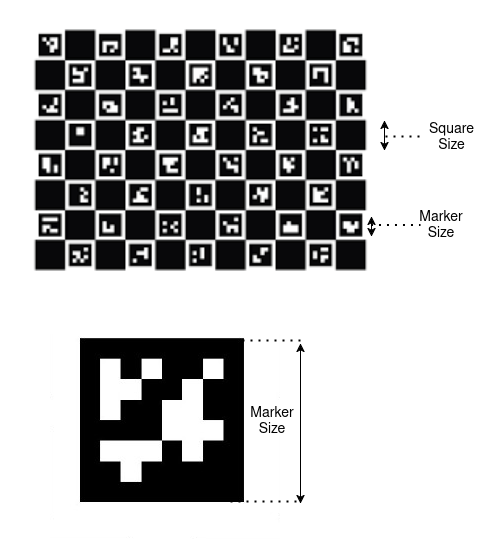
marker_type: Type of the marker to detect: *0: ArUco *1: ChArUco *2: Chessboardvertical_squares: Number of squares in the vertical directionhorizontal_squares: Number of squares in the horizontal directionsquare_length: Length of a single square in metersmarker_dictionary: Dictionary of markers to use. Supported options: *DICT_4X4_250*DICT_5X5_250*DICT_6X6_250*DICT_7X7_250*DICT_ARUCO_ORIGINALmarker_length: Length of the marker square including white borders (default: 0.03 meters)marker_frame: Target parent coordinate frame for the detected marker pose. (default:”camera_color_optical_frame”)timeout: Timeout in seconds to stop marker detection if no marker is found (default: 5)
Note
For ArUco markers, parameters
vertical_squaresandhorizontal_squaresare always set to 1The Detected Marker Pose is with respect to the camera frame
Class Definition
neurapy_ai.clients.marker_detection_client
Methods
Method |
Description |
|---|---|
|
Detect marker(s) and return their pose(s) in the requested frame. |
|
Backwards-compatible wrapper around |
|
Get pose of a standard calibration board (14x9). Returns ReturnCode and Pose object. |
|
Activate marker detection stream. Returns ReturnCode indicating success or failure. |
|
Deactivate marker detection stream. Returns ReturnCode indicating success or failure. |
Example
 1from neurapy_ai.clients.marker_detection_client import MarkerDetectionClient
 2from neurapy_ai.utils.return_codes import ReturnCodes
 3
 4# Initialize Marker Detection Client
 5mdc = MarkerDetectionClient()
 6
 7# Define detection parameters
 8marker_type = 1  # ChArUco marker
 9vertical_squares = 14
10horizontal_squares = 9
11square_length = 0.04
12marker_dictionary = "DICT_5X5_250"
13marker_length = 0.03
14
15try:
16    # Detect marker
17    ret_code, markers = mdc.get_detected_marker(
18        marker_type=marker_type,
19        vertical_squares=vertical_squares,
20        horizontal_squares=horizontal_squares,
21        square_length=square_length,
22        marker_dictionary=marker_dictionary,
23        marker_length=marker_length,
24        timeout=5
25    )
26
27    # Deactivate detection stream
28    mdc.deactivate_detection()
29
30    if ret_code.value != ReturnCodes.SUCCESS:
31        print(ret_code.message)
32    elif markers is None:
33        print("No marker was detected!")
34    else:
35        for marker in markers:
36            print(f"Marker ID: {marker.id}")
37            print(f"Marker Pose: {marker.pose}")
38
39except Exception as e:
40    print(e)
Notes
Camera calibration is required for accurate marker pose estimation
Service calls have a configurable timeout for marker detection
The client automatically manages detection streams
Detection results include marker IDs and poses in camera frame
The client supports multiple marker types and dictionaries
The client inherits error handling and logging from BaseAiClient
Marker poses are returned in the camera’s optical frame
Pointing Pick Client
The Pointing Pick Client provides functionality to generate grasps for objects that a human operator points to. The operator is prompted to point their forefinger to the object within the chosen workspace for which grasps are to be generated.
Parameters
workspace_name: Name of the recorded workspace to use for detectiongripper_name: Name of the gripper to use for grasping (must not be empty)object_name: Name of the object to pick (if empty, a random object will be assumed)
Class Definition
Methods
Method |
Description |
|---|---|
|
Start grasp detection process. |
|
Wait for detection to complete and return the generated grasp candidates. |
|
Stop the detection process (cancels active goals). |
Example
 1from neurapy_ai.clients.pointing_pick_client import PointingPickClient
 2from neurapy_ai.utils.return_codes import ReturnCodes
 3
 4# Initialize Pointing Pick Client
 5ppc = PointingPickClient()
 6
 7# Define detection parameters
 8workspace_name = "workspace_3"  # Name of recorded workspace
 9gripper_name = "RobotiQ_140"   # Name of gripper from GUI settings
10object_name = ""               # Empty for random object selection
11
12try:
13    # Start grasp detection
14    ret_code = ppc.start_detection(
15        workspace_name=workspace_name,
16        gripper_name=gripper_name,
17        object_name=object_name
18    )
19
20    if ret_code.value != ReturnCodes.SUCCESS:
21        print(ret_code.message)
22    else:
23        # Get detected grasps
24        ret_picks, picks = ppc.get_picks()
25        if ret_picks.value != ReturnCodes.SUCCESS:
26            print(ret_picks.message)
27        else:
28            for pick in picks:
29                print(f"Grasp ID: {pick.grasp_id}")
30                print(f"Grasp Quality: {pick.quality}")
31                print(f"Object: {pick.object_with_pose.name}")
32                print(f"Grasp Pose: {pick.approach_sequence.pick_pose.pose}")
33
34    # Stop detection
35    ppc.stop()
36
37except Exception as e:
38    print(e)
Notes
The operator must point with their index finger for a few seconds
The client provides audio feedback when the object is detected
Grasp detection has a 30-second timeout
The client automatically handles vision data acquisition
Grasp poses include pre-grasp, grasp, and post-grasp positions
The client supports multiple gripper types
Detection can be stopped at any time using the stop() method
Pointing Point Detection Client
The Pointing Point Detection Client provides functionality to detect the location that a human operator points to. The operator is prompted to point with their forefinger to a desired location on a workspace surface. Their hand should be in the camera view and the projected pointed location on the surface is detected.
Parameters
workspace_name: Name of the registered workspace to use for detection
Class Definition
Methods
Method |
Description |
|---|---|
|
Start detecting the pointed location. |
|
Wait for detection to complete and return the detected point as a pose. |
|
Stop the detection process (cancels active goals). |
Example
 1from neurapy_ai.clients.pointing_point_detection_client import PointingPointDetectionClient
 2from neurapy_ai.utils.return_codes import ReturnCodes
 3
 4# Initialize Pointing Point Detection Client
 5ppdc = PointingPointDetectionClient()
 6
 7# Define detection parameters
 8workspace_name = "workspace_3"  # Name of registered workspace
 9
10try:
11    # Start point detection
12    ret_code = ppdc.start_detection(workspace_name)
13
14    if ret_code.value != ReturnCodes.SUCCESS:
15        print(ret_code.message)
16    else:
17        # Get detected point
18        ret_point, pose = ppdc.get_point()
19        if ret_point.value != ReturnCodes.SUCCESS:
20            print(ret_point.message)
21        else:
22            print("Detected Point:")
23            print(f"Translation: {pose.translation}")
24            print(f"Orientation: {pose.orientation}")
25
26    # Stop detection
27    ppdc.stop()
28
29except Exception as e:
30    print(e)
Notes
The operator must point with their index finger within camera view
Detection has a 30-second timeout
The detected point is returned as a pose relative to the robot
The client automatically handles detection process
Detection can be stopped at any time using the stop() method
The client uses ROS action client for communication
The detected point is projected onto the workspace surface
Pose Estimation Client
The Pose Estimation Client provides functionality to estimate 6D poses of objects in the workspace. Object poses can be estimated using a trained pose estimation model or a new pose estimation model can be trained on a neura-style dataset.
Parameters
model_name: Name of the pose estimation model to usemodel_version: Version of the pose estimation model (optional, defaults to newest)class_names: List of object names to be detectedmethod: Pose estimation method to use. Currently supported methods: *neura_DLPE1*neura_nonDLPE1*neura_nonDLPE2target_frame: Reference frame where the pose will be calculated
Class Definition
Methods
Method |
Description |
|---|---|
|
Load a new pose estimation model. |
|
Get the currently loaded model name + version (and return code). |
|
Load a new pose estimation method. |
|
Get the current pose estimation method (and return code). |
|
Get pose estimates for all objects or a filtered subset by class name. |
|
Get pose estimates from a provided RGB-D image + intrinsics. |
|
Register the current camera view for multiview pose estimation. |
|
Clear stored camera views for multiview pose estimation. |
|
Get pose estimates from the registered multiview scene. |
Example
 1from neurapy_ai.clients.pose_estimation_client import PoseEstimationClient
 2from neurapy_ai.utils.return_codes import ReturnCodes
 3
 4# Initialize Pose Estimation Client
 5pec = PoseEstimationClient()
 6
 7# Define detection parameters
 8model_name = "tower_building"  # Your custom model name
 9method = 'neura_DLPE1'  # or 'neura_nonDLPE1', 'neura_nonDLPE2'
10class_names = ["puzzle_cuboid", "puzzle_cuboid_red", "puzzle_half_trapezoid"]
11target_frame = "root_link"
12
13try:
14    # Set model (optional: define version number)
15    ret = pec.set_model(model_name)
16
17    if ret.value != ReturnCodes.SUCCESS:
18        print(ret.message)
19    else:
20        # Get current model info
21        model_name_loaded, model_version_loaded, ret_get_model = pec.get_model()
22        print(f"Pose Estimation Model: {model_name_loaded} ({model_version_loaded})")
23
24        # Set and verify method
25        ret_set = pec.set_method(method)
26        if ret_set.value != ReturnCodes.SUCCESS:
27            print(ret_set.message)
28        else:
29            method_used, ret_get_m = pec.get_method()
30            if ret_get_m.value != ReturnCodes.SUCCESS:
31                print(ret_get_m.message)
32            else:
33                print(f"Used method: {method_used}")
34
35                # Get pose estimates
36                ret_detect, poses_list = pec.get_poses(
37                    class_names=class_names,
38                    target_frame=target_frame
39                )
40                if ret_detect.value != ReturnCodes.SUCCESS:
41                    print(ret_detect.message)
42                else:
43                    for pose in poses_list:
44                        print(f"Pose {pose.object_with_pose.name} value: {pose.object_with_pose.pose}")
45                        print(f"Pose characteristics:")
46                        print(f"  Score: {pose.detection_score}")
47                        print(f"  Confidence: {pose.pose_confidence}")
48                        print(f"  Mesh: {pose.mesh_folder_path}")
49                        print(f"  Segmentation index: {pose.segmentation_index}")
50
51except Exception as e:
52    print(e)
Notes
Multiple pose estimation methods are supported (neura_DLPE1, neura_nonDLPE1, neura_nonDLPE2)
Models can be trained on neura-style datasets (see DataGenerationClient)
The client supports both single-view and multiview pose estimation
Pose estimates include detection scores and confidence values
The client can handle different coordinate frame transformations
Camera intrinsics are required for image-based pose estimation
The client provides detailed error messages for debugging
Pose estimates include mesh information for visualization
Real Data Collection Client
The Real Data Collection Client provides functionality to capture new images and save them as a dataset. It supports different dataset types for various annotation requirements.
Parameters
dataset_type: Type of dataset to create. Available types: *TO_LABEL: Images that must be annotated with objects of interest *ENVIRONMENT: Images containing no objects of interest, intended for capturing environmental contextdataset_name: Name of the dataset that will be created
Class Definition
neurapy_ai.clients.real_data_collection_client
Methods
Method |
Description |
|---|---|
|
Save an image from the robot camera. |
|
Create a dataset from the collected images. |
|
Clear all images that haven’t been saved as a dataset yet. |
Example
 1from neurapy_ai.clients.real_data_collection_client import RealDataCollectionClient
 2from neurapy_ai.utils.return_codes import ReturnCodes
 3
 4# Initialize Real Data Collection Client
 5rdcc = RealDataCollectionClient()
 6
 7# Define dataset parameters
 8dataset_name = "example_dataset"
 9dataset_type = RealDataCollectionClient.DatasetTypes.TO_LABEL  # or ENVIRONMENT
10
11try:
12    # Save an image
13    ret_image = rdcc.save_image()
14    if ret_image.value != ReturnCodes.SUCCESS:
15        print(ret_image.message)
16    else:
17        print("Image saved successfully")
18
19        # Save dataset
20        ret_dataset = rdcc.save_dataset(dataset_type, dataset_name)
21        if ret_dataset.value != ReturnCodes.SUCCESS:
22            print(ret_dataset.message)
23        else:
24            print(f"Dataset '{dataset_name}' created successfully")
25
26            # Clear unsaved images
27            ret_clear = rdcc.clear_data()
28            if ret_clear.value != ReturnCodes.SUCCESS:
29                print(ret_clear.message)
30            else:
31                print("Unsaved images cleared successfully")
32
33except Exception as e:
34    print(e)
Notes
Two dataset types are supported: TO_LABEL and ENVIRONMENT
Images must be saved before creating a dataset
The client automatically handles ROS service communication
Error messages provide detailed information about failures
The client maintains a clean state by allowing data clearing
Dataset names must be unique
The client supports both labeled and unlabeled data collection
Robot Scan Client
The Robot Scan Client provides functionality to perform a scan of the robot’s environment and generate a mesh file of the scanned scene. It supports different scanning types and camera pose estimation methods.
Parameters
workspace_name: Name of the available workspace in the databasefile_name: Name of the output mesh file from scan processcam_pose_type: Method for estimating camera pose: *0: Use robot posescan_type: Type of scanning to perform: *1: Workspace scanning *2: Environment scanningscene_id: ID of the scene that robot scans (optional, defaults to 0)data_path: Directory to save scan output (optional, defaults to “”)
Class Definition
Methods
Method |
Description |
|---|---|
|
Start the scanning process with the given parameters. |
|
Stop scanning and return the reconstructed scene mesh. |
|
Resume scanning after pausing. |
|
Pause the scanning process. |
|
Force stop the scanning process even during robot motion. |
Example
 1from neurapy_ai.clients.robot_scan_client import RobotScanClient
 2from neurapy_ai.utils.return_codes import ReturnCodes
 3
 4# Initialize Robot Scan Client
 5rsc = RobotScanClient()
 6
 7# Define scanning parameters
 8workspace_name = "workspace_1"
 9file_name = "my_scan"
10cam_pose_type = 0  # Use robot pose
11scan_type = 1  # Workspace scanning
12
13try:
14    # Start scanning process
15    ret = rsc.start_scanning(
16        workspace_name=workspace_name,
17        file_name=file_name,
18        cam_pose_type=cam_pose_type,
19        scan_type=scan_type
20    )
21
22    if ret.value != ReturnCodes.SUCCESS:
23        print(ret.message)
24    else:
25        print("Scanning started successfully")
26
27        # Optional: Pause scanning
28        ret_pause = rsc.pause()
29        if ret_pause.value == ReturnCodes.SUCCESS:
30            print("Scanning paused")
31
32            # Resume scanning
33            ret_resume = rsc.resume()
34            if ret_resume.value == ReturnCodes.SUCCESS:
35                print("Scanning resumed")
36
37        # Stop scanning and get mesh
38        ret_stop, mesh = rsc.stop()
39        if ret_stop.value == ReturnCodes.SUCCESS:
40            print(f"Scanning completed. Mesh saved as {file_name}")
41        else:
42            print(ret_stop.message)
43
44except Exception as e:
45    print(e)
46    # Force stop if needed
47    rsc.hard_stop()
Notes
Three camera pose estimation methods are supported: *
0: Use robot poseThree scanning types are available: *
1: Workspace scanning *2: Environment scanningThe client supports texture mapping for better visualization
Scanning can be paused and resumed during operation
A hard stop is available for emergency situations
The client automatically handles ROS service communication
Mesh files are saved in the specified data path
The client provides detailed feedback during scanning
Scene pointcloud is published to octomap server after stopping
Voice Control Client
The Voice Control Client provides functionality to interact with the voice pipeline for getting and setting commands. It supports both blocking and non-blocking command detection with voice trigger “Hey Maira”.
Parameters
timeout: Time to wait for the command in seconds (optional, defaults to None - no timeout)command: Command to be detected or set. Examples: *"open gripper"*"move axis two five degrees"*"move axis five"*"inner_command: continue with beep"similar: Flag to enable similar command detection (optional, defaults to False)
Class Definition
Methods
Method |
Description |
|---|---|
|
Get the result of a specific triggered voice command. |
|
Blocking call to wait for a voice command (optionally with timeout). |
|
Configure which command to detect (non-blocking). |
|
Get the last detected command (requires continuous detection to be active). |
|
Start continuous detection (blocking) and return the last command. |
|
Check whether a command finished executing. |
Example
 1from neurapy_ai.clients.voice_control_client import VoiceControlClient
 2from neurapy_ai.utils.return_codes import ReturnCodes
 3
 4# Initialize Voice Control Client
 5vcc = VoiceControlClient()
 6
 7try:
 8    # Blocking call with timeout
 9    ret_code, command = vcc.get_command(timeout=5)
10    if ret_code.value == ReturnCodes.SUCCESS:
11        print(f"Detected command: {command}")
12    else:
13        print(ret_code.message)
14
15    # Get command with trigger
16    command = "open gripper"
17    ret_trigger, returned_command = vcc.get_command_with_trigger(command)
18    if ret_trigger.value == ReturnCodes.SUCCESS:
19        print(f"Command result: {returned_command}")
20    else:
21        print(ret_trigger.message)
22
23    # Handle confirmation command
24    ret_code, voice_return = vcc.get_command_with_trigger(
25        "inner_command: continue with beep"
26    )
27    if ret_code.value == ReturnCodes.SUCCESS:
28        if voice_return == "continue":
29            print("Command confirmed")
30        elif voice_return == "terminate":
31            print("Command terminated")
32
33    # Non-blocking command setting
34    success, msg = vcc.set_command("move axis five", similar=False)
35    if success:
36        print("Command set successfully")
37    else:
38        print(f"Setting command failed: {msg}")
39
40    # Check command execution
41    if vcc.finish():
42        print("Command executed successfully")
43
44except Exception as e:
45    print(e)
Notes
Commands must be triggered by saying “Hey Maira”
Both blocking and non-blocking operations are supported
Command detection can be configured with timeout
The client maintains command history
Similar command detection is available
The client supports command confirmation flow
Voice commands are processed in real-time
The client provides detailed error messages
Command execution status can be monitored
Experimental Clients
Audio Output Client
The Audio Output client is an implementation for playing audio files on the robot.
Class Definition
neurapy_ai.experimental.clients.audio_output_client
Methods
Method |
Inputs / Outputs |
|---|---|
|
Play an audio file on the robot (ReturnCode indicates success/failure). |
|
Stop playing all audio in the robot system (publishes stop command). |
Bin Detection Client
The Bin Detection client provides methods to detect and retrieve the pose of bins within a workspace. It allows you to estimate a bin’s pose from point cloud data and access the most recently computed pose for downstream processing or motion planning tasks.
Class Definition
neurapy_ai.experimental.clients.bin_detection_client
Methods
Method |
Inputs / Outputs |
|---|---|
|
Detect bin pose from a provided |
|
Return the most recently detected bin pose (ReturnCode + |
Cartesian Path Generator Clients
These clients generate Cartesian waypoint paths for downstream motion planning.
Class Definition
neurapy_ai.experimental.clients.cartesian_path_generator_client
Methods
Client / Method |
Inputs / Outputs |
|---|---|
|
Load a previously saved cartesian path (ReturnCode + tuple of |
|
Generate a planar path from a service call (optionally save to file). |
|
Generate a path by tracking poses (action-based; optionally save to file). |
|
Generate a path based on a model + waypoint file (optionally save to file). |
Collision Detection Scene Client
The Collision Detection Client loads a collision scene.
Class Definition
neurapy_ai.experimental.clients.collision_detection_client
Methods
Method |
Inputs / Outputs |
|---|---|
|
Initialize (or load) a collision scene by ID. |
|
Attach an object to the active gripper (placeholder). |
|
Remove temporary objects/point clouds (placeholder). |
|
Add a mesh collision object (placeholder). |
|
Add a primitive collision object (placeholder). |
|
Capture current environment and add to scene (placeholder). |
Grasp Generator Client
The Grasp Generator Client initiates grasp generation and provides access to the resulting grasp candidates as Pick objects. It enables you to supply perception data and task context, trigger grasp computation, and retrieve structured pick results for execution or further planning.
Class Definition
neurapy_ai.experimental.clients.grasp_generator_client
Methods
Method |
Inputs / Outputs |
|---|---|
|
Generate grasp candidates. Key inputs include:
|
|
Block until motion is allowed; returns ReturnCode + |
|
Blocking call that returns the generated picks. |
|
Return picks grouped by detected instance ID. |
|
Cancel all active goals. |
Note
generate_grasps has a long signature; refer to the Python API for the full parameter list.
Hand Detection Client
The Hand Detection client tracks the index finger while it is moving and returns a time-ordered series of poses. These poses represent consecutive waypoints along the finger’s motion trajectory and can be used for gesture recording, path teaching, or real-time robot guidance.
Class Definition
neurapy_ai.experimental.clients.hand_detection_client
Methods
Method |
Inputs / Outputs |
|---|---|
|
Detect a series of pointed poses (ReturnCode + list of waypoint poses). |
Note
The current implementation’s type hint says -> ReturnCode, but it returns (ReturnCode, waypoints).
IK Solver Client
The IK Solver client computes inverse kinematics solutions for a given target pose.
Class Definition
neurapy_ai.experimental.clients.ik_solver_client
Methods
Method |
Inputs / Outputs |
|---|---|
|
Compute IK (ReturnCode + joint state solution). |
Instance Segmentation Client
The Instance Segmentation Client extends the stable instance segmentation client.
Class Definition
neurapy_ai.experimental.clients.instance_segmentation_client
Methods
Method |
Inputs / Outputs |
|---|---|
|
Segment instances from a ROS |
Motion Execution Client (Experimental)
The Motion Execution Client executes given trajectories.
Class Definition
neurapy_ai.experimental.clients.motion_execution_client
Methods
Method |
Inputs / Outputs |
|---|---|
|
Execute a trajectory (ReturnCode indicates success/failure). |
|
Load trajectory JSON from file and execute all contained segments. |
Motion Planning Client (Experimental)
The experimental motion planning client plans joint trajectories for joint goals, pose goals, or waypoint paths.
Class Definition
neurapy_ai.experimental.clients.motion_planning_client
Methods
Method |
Inputs / Outputs |
|---|---|
|
Plan motion to a joint-space goal. |
|
Plan motion to a Cartesian pose goal. |
|
Plan motion through Cartesian waypoints (optionally save trajectory). |
|
Load a previously saved trajectory by filename. |
|
Merge sequential trajectory segments into a single trajectory. |
|
Read current joint positions from |
|
Update motion planner parameters via dynamic reconfigure. |
Note
Some debug visualization helper methods in the implementation are deprecated and raise DeprecationWarning.
Object Manipulation Client
The Object ManipulationClient queries a manipulation/regrasp sequence between start and end picks.
Class Definition
neurapy_ai.experimental.clients.object_manipulation_client
Methods
Method |
Inputs / Outputs |
|---|---|
|
Compute a manipulation sequence (ReturnCode + |
Pick Offset Calculation Client (Experimental)
The experimental pick offset calculation client computes a Z-offset for the next place operation based on a previously executed pick and a workspace.
Class Definition
neurapy_ai.experimental.clients.offset_calculation_client
Methods
Method |
Inputs / Outputs |
|---|---|
|
Start the offset calculation in a worker thread. |
|
Block until the calculation finishes and return the offset. |
Pick & Place Motion Planning Client
The Pick and Place Motion Planning Client plans approach/grasp/retreat motions for a single pick (or place) candidate and can optionally use a planning scene for collision checking.
Class Definition
neurapy_ai.experimental.clients.pickplace_motion_planning_client
Methods
Method |
Inputs / Outputs |
|---|---|
|
Enable/disable planning scene collision checking. |
|
Plan the motion to execute a pick (ReturnCode + |
|
Plan motion for multiple pick candidates. |
|
Plan motion to execute a place candidate. |
Place Planner Client
The experimental place planner client generates place approach sequences for grid-based, point-based, or gesture-based place groups.
Class Definition
neurapy_ai.experimental.clients.place_planner_client
Methods
Method |
Inputs / Outputs |
|---|---|
|
Initialize multiple place groups. |
|
Add a place group. |
|
Update the grid origin pose for a group. |
|
Get the next place sequence (ReturnCode + index + approach sequence). |
|
Get all free place sequences (ReturnCode + sequences + free IDs). |
|
Mark place IDs as occupied. |
|
Reset occupancy (all or selected IDs). |
|
Return all used group IDs. |
Planning Scene Client
The Planning Scene Client updates the robot planning scene and octomap using point clouds or depth images, and can add/attach/remove collision objects.
Class Definition
neurapy_ai.experimental.clients.planning_scene_client
Methods
Method |
Inputs / Outputs |
|---|---|
|
Start/stop voxel updates. |
|
Publish octomap from a point cloud topic. |
|
Publish octomap from depth image + camera info topics. |
|
Publish octomap from a provided depth image. |
|
Publish octomap from a provided point cloud message. |
|
Clear the octomap. |
|
Add boxes to the planning scene. |
|
Add spheres to the planning scene. |
|
Add meshes to the planning scene. |
|
Attach boxes to a robot link. |
|
Attach spheres to a robot link. |
|
Attach meshes to a robot link. |
|
Detach an attached solid. |
|
Detach an attached mesh. |
|
Remove objects from the planning scene. |
Note
The implementation contains additional helpers such as add_cage, add_bin, and reset_octomap.
Pose Estimation Client
The Pose Estimation Client extends the stable client with additional helpers for:
estimating poses from a full scene definition
estimating poses from instance segmentation results
Class Definition
neurapy_ai.experimental.clients.pose_estimation_client
Methods
Method |
Inputs / Outputs |
|---|---|
|
Pose estimation for a provided RGB-D scene. |
|
Pose estimation constrained by instance segmentation results. |
|
ROS-message friendly version of segmentation-constrained pose estimation. |
|
Fetch RGB image, depth image, intrinsics, and target-to-camera transform. |
Stable Pose Generator Client
The Stable Pose Generator Client computes stable poses for an object given a contact pose.
Class Definition
neurapy_ai.experimental.clients.stable_poses_generator_client
Methods
Method |
Inputs / Outputs |
|---|---|
|
Start stable pose generation in a worker thread. |
|
Block until finished and return stable poses as |
Robot Actions
Robot actions provide advanced robot movements like pick, place and moving with collision avoidance.
The robot actions class can be imported from the neurapy_ai_utils.functions.robot_actions package and initiated providing robot information like kinematics and gripper.
1from neurapy_ai_utils.functions.robot_actions import RobotActions
2from neurapy_ai_utils.robot.moveit_kinematics import MairaKinematics
3from neurapy_ai_utils.robot.robot import Robot
4
5robot = Robot(MairaKinematics(), DummyGripper())
6robot_actions = RobotActions(robot)
Below is an example of how to pick objects using the MarkerDetectionClient to detect the object’s pose and execute the robot’s pick actions.
 1import rospy
 2from neurapy_ai.clients.marker_detection_client import MarkerDetectionClient
 3from neurapy_ai.return_codes import ReturnCodes
 4
 5from neurapy_ai_utils.grippers.gripper_interface import DummyGripper
 6from neurapy_ai_utils.robot.kinematics_interface import DummyKinematics
 7from neurapy_ai_utils.robot.moveit_kinematics import MoveitKinematics
 8from neurapy_ai_utils.robot.robot import Robot
 9from neurapy_ai_utils.functions.robot_actions import RobotActions
10
11if __name__ == "__main__":
12    marker_detection_client = MarkerDetectionClient()
13    rospy.init_node("robot_action_pick")
14
15    robot = Robot(MairaKinmatics(), DummyGripper())
16    robot_actions = RobotActions(robot)
17    # define a oberserve postion to record the workspace
18    observe_position = [0, 0, 0, 1.5, -1.5, 0, 0]
19    drop_position = observe_position
20    # move to robot to the observe position
21    robot.move_joint_to_joint(observe_position)
22    return_code, tags, ids = marker_detection_client.getMarkers(10)
23
24    if return_code != ReturnCodes.SUCCESS or len(tags) == 0:
25        print("Something went bad")
26        exit(0)
27
28    print("---- Picking the object ---- ")
29
30    robot.actions.pick(tags[0], 0.1, -0.1)
31
32    print("---- Droping the object ---- ")
33
34    robot.move_joint_to_joint(drop_position)
35    robot.gripper.open()
Collision Avoidance
The neurapy_ai_utils.functions.robot_actions_with_motion_planning_impl package provides robot actions with collison-aware motion planning.
Further Code Examples
Pick with Voice Handover
There are multiple identical objects in the workspace. The robot picks one object after the other and hands it to the operator. The operator coordinates the handover using their voice.
  1import logging
  2from typing import List
  3from neurapy_ai.clients.autonomous_pick_client import AutonomousPickClient
  4from neurapy_ai.clients.database_client import DatabaseClient
  5from neurapy_ai.utils.return_codes import ReturnCodes
  6
  7from neurapy_ai_utils.robot.robot import Robot
  8from neurapy_ai_utils.robot.maira_kinematics import MairaKinematics
  9from neurapy_ai_utils.functions.robot_actions import RobotActions
 10import rospy
 11
 12
 13class DemoAutonomousPick:
 14    def __init__(self, id_manager=None):
 15        self._APC = AutonomousPickClient()
 16
 17        # Initialize a robot and actions
 18        self._robot = Robot(MairaKinematics(id_manager=id_manager))
 19        self._robot_actions = RobotActions(self._robot)
 20
 21    def set_motion_param(self, speed_mj, speed_ml, acc_mj, acc_ml):
 22        self._robot.set_motion_param(speed_mj, speed_ml, acc_mj, acc_ml)
 23
 24    def set_parameter(self, param_name, value):
 25        self._APC.set_parameter(param_name=param_name, value=value)
 26
 27    def move_to_look_at_point(self, look_at_point: List[float]):
 28        self._robot.move_joint_to_joint(look_at_point)
 29
 30    def execute(
 31        self,
 32        workspace_name: str,
 33        gripper_name: str,
 34        object_names: List[str] = [],
 35        bin_name: str = "",
 36        use_path_planning=False,
 37    ):
 38        self._robot.change_gripper_to(gripper_name)
 39        # Detect picks
 40        picks = []
 41        return_code = self._APC.start_detection(
 42            object_names=object_names,
 43            workspace_name=workspace_name,
 44            gripper_name=gripper_name,
 45            bin_name=bin_name,
 46        )
 47        if return_code.value != ReturnCodes.SUCCESS:
 48            logging.warning("Fail to start detection!")
 49            logging.warning(
 50                return_code.message + "with value: " + str(return_code.value)
 51            )
 52            return picks
 53
 54        return_code, picks = self._APC.get_picks()
 55        if return_code.value != ReturnCodes.SUCCESS:
 56            logging.warning("No valid sequence find!")
 57            logging.warning(
 58                return_code.message + "with value: " + str(return_code.value)
 59            )
 60            return
 61
 62        # Execute picks
 63        logging.info("Start picking!")
 64        if len(picks) != 0:
 65            if use_path_planning:
 66                self._robot_actions.pick_with_collision_avoidance(picks[0])
 67            else:
 68                self._robot_actions.pick(picks[0])
 69        logging.info("Finish!")
 70        return
 71
 72
 73if __name__ == "__main__":
 74    rospy.init_node("demo_autonomous_pick")
 75    demo = DemoAutonomousPick()
 76    db_client = DatabaseClient()
 77
 78    workspace_name = "test_table"    # Change values according to your setup
 79    gripper_name = "RobotiQ"         # Change values according to your setup
 80
 81    object_names = [] # Leave empty for general pick
 82    bin_name = ""
 83
 84    speed_mj = 20
 85    speed_ml = 0.1
 86    acc_mj = 20
 87    acc_ml = 0.1
 88
 89    use_path_planning = False
 90
 91    demo.set_parameter("enable_collision_checking_with_pointcloud", 1)
 92    demo.set_parameter("max_aperture", 0.12)
 93    demo.set_parameter("thresh_rad", 20)
 94    demo.set_parameter("default_opening", 0.12)
 95    demo.set_parameter("ranking_method", 0)
 96    demo.set_parameter("collision_space_padding", 0.005)
 97    demo.set_motion_param(speed_mj, speed_ml, acc_mj, acc_ml)
 98
 99    # Save points where the robot observes the workspace and where it hands over the picked object
100    # and name them "observe" and "handover" respectfully
101    return_code, observe_point = db_client.get_joint_positions("observe")
102    if return_code.value < 0:
103        raise Exception(return_code.message)
104    return_code, handover_point = db_client.get_joint_positions("handover")
105    if return_code.value < 0:
106        raise Exception(return_code.message)
107
108    for i in range(3):
109        demo._robot.move_joint_to_joint(observe_point)
110        demo._robot.gripper.open()
111        demo.execute(
112            workspace_name, gripper_name, object_names, bin_name, use_path_planning
113        )
114        demo._robot.move_joint_to_joint(handover_point)
115        # use voice control: Say Yes/No when asked whether top open gripper
116        return_code, voice_return = voice_control_client.get_command_with_trigger(
117                                        "Gripper open"
118                                    )
119        if voice_return == "Gripper open":
120            demo._robot.gripper.open()
121            return_code, voice_return = voice_control_client.get_command_with_trigger(
122                                            "inner_command: continue"
123                                        )
124            if voice_return == "continue":
125                continue
126            else:
127                return
Scan with Audio Feedback
Execute a scan of a workspace and notifying the user of the status using audio by combining multiple clients.
 1from neurapy_ai_utils.robot.robot import Robot
 2from neurapy_ai_utils.robot.maira_kinematics import MairaKinematics
 3
 4from neurapy_ai.clients.robot_scan_client import RobotScanClient
 5from neurapy_ai.clients.database_client import DatabaseClient
 6from neura_ai_robot_api.clients.audio_output_client import AudioOutputClient
 7
 8import pathlib
 9import rospy
10
11rospy.init_node("robot_scan_demo")
12
13RS = RobotScanClient()
14db_client = DatabaseClient()
15robot = Robot(MairaKinematics())
16AOC = AudioOutputClient()
17audio_dir = "{}/demo_scan/audio/".format(
18    str(pathlib.Path(__file__).resolve().parents[3])
19)
20
21scan_params = {
22    "simplified_factor_env": 0.8,
23    "simplified_factor_obj": 0.7,
24    "voxel_size_env": 0.035,
25    "voxel_size_obj": 0.002
26}
27RS.set_parameters(scan_params)
28
29# the observe point has to be defined in GUI
30return_code, observe_point = db_client.get_joint_positions("observe")
31observe_point = []
32
33# scan points named "scan_point_{0,1,2}" should be defined
34scan_points = []
35for i in range(3):
36    ret, point = db_client.get_joint_positions(f"scan_point_{i}")
37    scan_points.append(point)
38
39robot.move_joint_to_joint(self._scan_point_list[0], 30.0)
40AOC.play_audio(self._audio_dir + "start-scanning.wav", False)
41
42# A workspace named "ws_1" needs to be created on the robot
43# from the Wizards > Workspace page
44ret = self._RS.start_scanning(
45    workspace_name="ws_1",
46    file_name="my_workspace",
47    cam_pose_type=0,
48    scan_type=1,
49)
50robot.move_joint_via_points(scan_points, 30.0, 30.0)
51AOC.play_audio(
52    self._audio_dir + "The-scanning-is-finishedI-am-r.wav", False
53)
54ret, cloud = self._RS.stop()
Move to Marker Location
Use an AruCo marker as target position for the robot. The marker can be moved after each motion execution.
 1from neurapy_ai_utils.robot.robot import Robot
 2from neurapy_ai_utils.robot.maira_kinematics import MairaKinematics
 3
 4from neurapy_ai.clients.marker_detection_client import MarkerDetectionClient
 5from neurapy_ai.clients.database_client import DatabaseClient
 6
 7import rospy
 8
 9if __name__ == "__main__":
10
11    # Initialize a robot and actions
12    robot = Robot(MairaKinematics(id_manager=id_manager))
13
14    # --- INITIAL JOINT STATE & CARTESIAN POSE
15    previous_joint_angles = robot_status.getRobotStatus("jointAngles")
16    previous_cartesian_poses = robot_handler.ik_fk(
17        "fk", target_angle=previous_joint_angles
18    )
19
20    # --- RUN MARKER DETECTION
21
22    rospy.init_node("test_marker_detection", anonymous=True)
23    detect_marker_client = MarkerDetectionClient()
24    db_client = DatabaseClient()
25
26    # Move to observe position
27    res, observe_point = db_client.get_joint_positions(
28        "observe"
29    )  # observe point has to be defined in GUI
30
31    if res.value < 0:
32        raise RuntimeError("Could not find point in the database")
33
34    robot.move_joint_to_joint(observe_point)
35
36    for i in range(5):
37        # Detect 4x4 Aruco markers
38        return_code, markers = detect_marker_client.get_detected_markers(1)
39
40        # --- MOVE ROBOT TO DETECTED MARKER
41
42        if len(markers) > 0:
43            # Move to the position of the first detected marker
44            target_point = robot_handler.ik_fk(
45                "ik",
46                target_pose=markers[0].pose.to_list(),
47                current_joint=previous_joint_angles,
48            )
49
50            robot.move_joint_to_joint(target_point)
51        else:
52            logging.warn("No marker detected. Trying again")
53
54        rospy.sleep(10)
Error & Warning Codes
Code |
Name |
Description |
|---|---|---|
0 |
|
Success. |
-1 |
|
Invalid argument passed to function. Check network connection! |
-2 |
|
Requested data is not available in the database. Check the type hint in the API for the function! |
-3 |
|
Unimplemented abstract method. |
-4 |
|
Server process is not up. Restart process on supervisor page! |
-5 |
|
Service called failed due to invalid input. |
-6 |
|
Service failed to be processed. |